This is question I’ve always pondered. I’ll never stop shooting film, but do I need to enlarge in a darkroom as well? Is scanning and printing a better option? A scanned negative can retain the total gradations and colors I get from film, but also gives me a digital master that can’t be lost, scratched, destroyed, etc.
If you shoot color film and make prints in the darkroom, you might assume that an analog print from an analog negative represents the most authentic and durable expression of your work. It feels right. The light that struck the emulsion passes through the negative, exposes chromogenic paper, and the chemistry does the rest. No computers, no conversions, no compromises.
But here’s the uncomfortable truth: that beautiful color darkroom print—made on the best fiber-based chromogenic paper available—will fade and shift in ways that a modern pigment inkjet print simply will not. The chemistry that makes color photography possible is the same chemistry that limits its permanence. And the gap isn’t small. It’s measured in generations.
This article makes the case for a hybrid approach to color film photography: shoot on film, develop in chemistry, scan the negative, and make your final print on a pigment inkjet printer. It’s not about abandoning analog. It’s about giving your color negatives the longevity they deserve.
The Problem with Color Darkroom Prints
Every color photograph—whether made on a negative, a slide, or a print—relies on organic dyes to produce its image. In a chromogenic print (often called a Type C print), dye couplers in the paper’s emulsion layers react during development to form cyan, magenta, and yellow dyes. These dyes are what you see when you look at a finished color print. They are also what will eventually betray it.
Organic dyes are inherently unstable. They are susceptible to light fading when displayed, and perhaps more insidiously, to dark fading—a slow chemical decomposition that occurs even when the print is stored in total darkness. The cyan dye layer is typically the most vulnerable to light fading, while the yellow layer is most prone to dark fading. The result, over decades, is a print that shifts toward magenta or red, loses shadow density, and develops a muddied, degraded appearance.
The best modern color papers have improved significantly over earlier generations. Fuji Crystal Archive, for example, is rated for roughly 60 years of display life under typical indoor lighting conditions, and perhaps 100 or more years in dark storage. That’s respectable—but it’s not what most photographers think of when they hear the word “archival.” And it’s worth noting that these ratings come with conditions: low-UV lighting, controlled humidity, no atmospheric pollutants. Real-world lifespans are often shorter.
What Makes Pigment Inkjet Different
Modern pigment inkjet printers—such as the Epson P900 with its UltraChrome Pro10 ink set—use an entirely different approach to creating color. Instead of organic dyes formed through chemical reactions, pigment inks deposit microscopic particles of inorganic pigment onto the paper surface. These particles are encapsulated in a resin that bonds them to the paper fibers.
The difference in permanence is dramatic. Wilhelm Imaging Research, the industry standard for print longevity testing, rates many Epson pigment ink and paper combinations at 200 years or more of display life under glass. Some combinations exceed 400 years. In dark storage, the numbers climb into centuries that start to feel more geological than photographic.
Why such a vast difference? Inorganic pigments are inherently more resistant to photochemical degradation than organic dyes. They don’t bleach as readily under UV exposure. They don’t undergo the slow internal chemical decomposition that plagues dye-based prints. And they’re far less susceptible to atmospheric contaminants like ozone and nitrogen oxides, which accelerate the fading of traditional color prints.
Print Longevity at a Glance
The following table compares the approximate display life and dark storage life of common photographic print types, based on Wilhelm Imaging Research data and industry estimates. Display life assumes typical indoor lighting behind glass.
| Print Type | Display Life | Dark Storage | Image Material |
| Chromogenic Color (Type C) | 60–100 years | 100–200 years | Organic dyes (cyan, magenta, yellow) |
| Pigment Inkjet (e.g., Epson P900) | 200–400+ years | 400+ years | Inorganic pigment in resin |
| Dye Inkjet | 20–60 years | 60–100 years | Organic dyes in solution |
| Silver Gelatin B&W (untoned) | 100–200 years | 200+ years | Metallic silver in gelatin |
| Silver Gelatin B&W (selenium toned) | 200+ years | 500+ years | Silver selenide in gelatin |
| Platinum/Palladium | 1,000+ years | 1,000+ years | Noble metal in paper fibers |
The Hybrid Workflow: Film Capture, Digital Output
A hybrid workflow for color film is straightforward: you shoot on film, develop the negatives using standard C-41 chemistry, scan the negatives at high resolution, and make your final prints on a pigment inkjet printer using archival paper.
The key equipment is a quality film scanner or a digital camera scanning setup. For medium format negatives, flatbed scanners like the Epson V850 remain popular and capable, resolving detail well beyond what most enlarger lenses can deliver. Dedicated film scanners and digital camera scanning rigs using macro lenses can push quality even higher, producing files that rival or exceed drum scans for a fraction of the cost.
What matters for this discussion is that scanning is a lossless capture of the information on the negative. The tonal qualities, the color palette, the grain structure—everything that makes the negative unique—is faithfully recorded in the digital file. The scan is not replacing the negative; it’s translating it into a format that can be printed with superior archival technology.
What You Gain
Dramatically Superior Print Longevity
This is the central argument. A pigment inkjet print of your color negative will outlast a darkroom chromogenic print by a factor of three to six times under display conditions. Your great-grandchildren will see the colors you intended. With a darkroom print, there’s a meaningful chance they won’t.
A Reprintable Digital Master
Once scanned, your negative exists as a high-resolution digital file that can be reprinted indefinitely with zero degradation. If a print is damaged, lost, or sold, you make another. You can also make multiple sizes, crop variations, and test prints without the expense and time of darkroom sessions. The original negative remains your primary artifact—the irreplaceable source—but you’re no longer entirely dependent on it for output.
Correction for Film Aging
Color negatives shift over time. The dyes in the emulsion slowly degrade, and different layers degrade at different rates, introducing color casts that weren’t present when the negative was fresh. A scan allows you to correct for these shifts digitally, recovering the original color balance. In the darkroom, correcting aged negatives requires laborious filtration testing and often yields imperfect results.
Archival Paper Choices
Inkjet printing opens up a world of archival paper options that simply don’t exist in the darkroom. 100% cotton rag papers like Hahnemühle Photo Rag, Canson Platine Fibre Rag, and Epson Legacy Platine offer surfaces that rival the finest fine art papers. These are acid-free, lignin-free substrates that will not yellow or deteriorate. Combined with pigment inks, they represent the most permanent color print technology available to photographers today.
What About Black and White?
Here’s where the calculus changes. For black-and-white photographers, the archival argument for hybrid printing is much weaker—and in some cases, it reverses entirely.
A properly processed and selenium-toned silver gelatin print on fiber-based paper is already one of the most permanent photographic objects you can make. The image is composed of silver selenide—a compound highly resistant to oxidation and chemical degradation. These prints have proven real-world longevity measured in centuries, not decades. The 19th-century albumen prints hanging in museums are silver-based, and many remain in excellent condition after 150 years.
Beyond permanence, there’s also the aesthetic case. A silver gelatin print has a tonal depth, a luminosity in the highlights, and a richness in the shadows that comes from actual metallic silver reflecting and absorbing light. It’s a fundamentally different visual experience than ink on paper, and many photographers—this author included—find it irreplaceable.
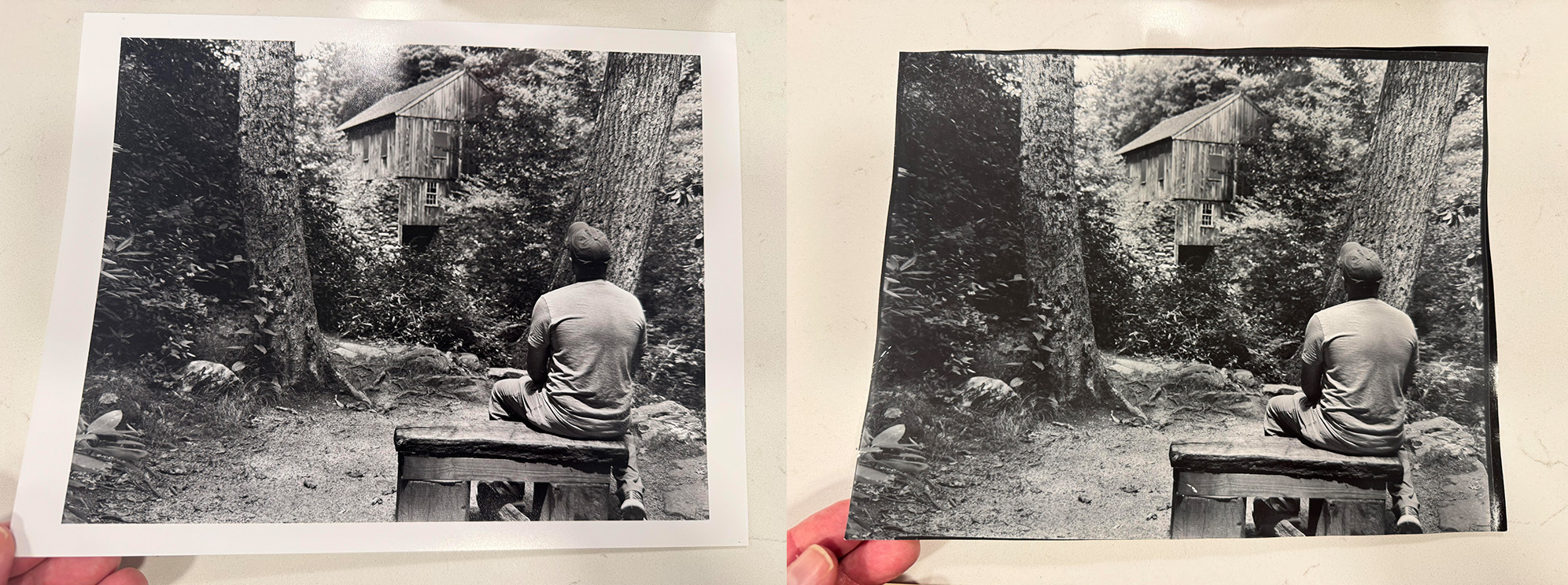
In the above example, the image on the left was made with the Epson P900 Inkjet Printer. The image on the right was printed in the darkroom, a contact print from an 8×10 negative. It’s not easy to show the differences online, but in-person the differences become very clear. The darkroom print has much greater tonality. The inject print, while not bad, feels as if thousands of levels of grey have been stripped away, when put next to the darkroom print.
And for those working in alternative processes like platinum/palladium, the longevity question is settled decisively in favor of the traditional process. Platinum and palladium are noble metals—they don’t oxidize, they don’t react with atmospheric contaminants, and they’re embedded directly in the paper fibers rather than sitting on the surface. These prints are effectively permanent on any timescale that matters to human civilization.
A Practical Framework
Given everything above, a sensible approach for photographers who work across both color and black-and-white might look like this:
Color negatives: Shoot on film, develop in C-41, scan at high resolution, and print on a pigment inkjet printer using archival cotton rag paper. Store the original negatives in archival sleeves as your primary source material. This gives you the color science of film with the permanence of pigment.
Black-and-white negatives: Stay in the darkroom. Print on fiber-based silver gelatin paper, tone in selenium, wash thoroughly, and dry with care. The traditional process already delivers exceptional archival quality, and the aesthetic is genuinely different from inkjet. Scanning is still valuable for cataloging, web use, and as a backup, but the definitive print is the one from the enlarger.
Alternative processes: Platinum, palladium, cyanotype, and other alternative process prints are already at the pinnacle of permanence. These are the domain of contact printing from large format negatives (or digitally produced negatives), and there is no archival reason to move away from them. If anything, they represent the end goal that modern inkjet technology is still trying to approach.
The Irony of Progress
There’s a satisfying irony in all of this. The most technologically modern printing method available to photographers—pigment inkjet—produces color prints that are dramatically more permanent than anything the traditional color darkroom can achieve. Meanwhile, the oldest and most primitive printing processes—silver, platinum, palladium—remain at the top of the permanence hierarchy for black-and-white work.
The lesson isn’t that digital is better or that analog is better. It’s that the right tool depends on the material. Color dyes are fragile; entrust your color prints to pigment. Silver is durable; let your black-and-white prints remain silver. And noble metals are essentially eternal; keep printing platinum.
The negative—that strip of film you pulled out of the developing tank—remains the heart of the process in either case. The hybrid workflow doesn’t diminish its role. It honors it by ensuring the print does justice to the image for as long as possible.
Recommended Equipment for a Hybrid Color Workflow
Scanning: Epson V850 flatbed for medium format (excellent value for 120 film), or a digital camera scanning setup with a macro lens and a quality film holder for maximum resolution. For 35mm, dedicated scanners like the Plustek OpticFilm series or Nikon Coolscan (used market) remain strong options.
Printing: Epson P900 (13” wide) or P5370 (17” wide) with UltraChrome Pro10 pigment inks. Canon’s imagePROGRAF PRO series with LUCIA PRO pigment inks is equally excellent. The key requirement is pigment-based inks, not dye-based.
Paper: For maximum archival quality, choose 100% cotton rag papers: Hahnemühle Photo Rag 308, Canson Platine Fibre Rag, Epson Legacy Platine, or Moab Entrada Rag. For a surface closer to traditional darkroom paper, baryta-coated inkjet papers like Hahnemühle FineArt Baryta or Canson Baryta Photographique offer a fiber-base look with pigment ink permanence.
Software: Negative Lab Pro (for Lightroom) or SilverFast for scan processing. These tools handle color negative inversion with sophistication that manual curves adjustment can’t easily match, preserving the color character of specific film stocks.
Final Thoughts
Film photography is, at its heart, about caring deeply about the image-making process. We choose to shoot film because the materials, the chemistry, and the craft matter to us. That same care should extend to how we print our work. For color film, the most caring thing you can do is acknowledge the material limitations of chromogenic printing and give your negatives a print that will last. The negative is still analog. The capture is still photochemical. The light still struck silver halide crystals, and chemistry still formed the latent image. A pigment inkjet print doesn’t erase any of that. It simply ensures that the final object—the thing you frame, display, and pass on—endures as long as the image deserves.
Purchasing gear from the above link helps me keep the site going!